
Some months are about new capabilities. Others are about making sure nothing breaks when the platform underneath you changes. June was mostly the second kind — and that work is worth more to a validated environment than a feature list.
All Products — Ready for Polarion 2606
Polarion 2606 moves to Tomcat 11, so javax.servlet becomes jakarta.servlet and servlet-based extensions stop loading until they are rebuilt. We migrated all of them: Risksheet, Powersheet, Gantt, Planningboard and Checklist shipped 2606-compatible builds on 15 June, about two weeks after the platform release, with Nextedy AI on 19 June. Each release archive now carries both variants — polarion-2512-and-older/ for Tomcat 9 and polarion-2606-and-newer/ for Tomcat 11 — and you deploy the one that matches your server, never both; the installation instructions in the bundle say which. One caveat before you upgrade: the 2606 updater blocks the update while any javax extension is still in /extensions, ours or anyone else’s, so clear or replace them first. Siemens covers the platform side in their note on updating custom extensions for Polarion 2606.
Powersheet
An Administrator’s Documentation Expert
Configuring a traceability sheet means knowing which property does what. Historically that meant searching documentation, reading someone else’s YAML, or filing a support ticket.
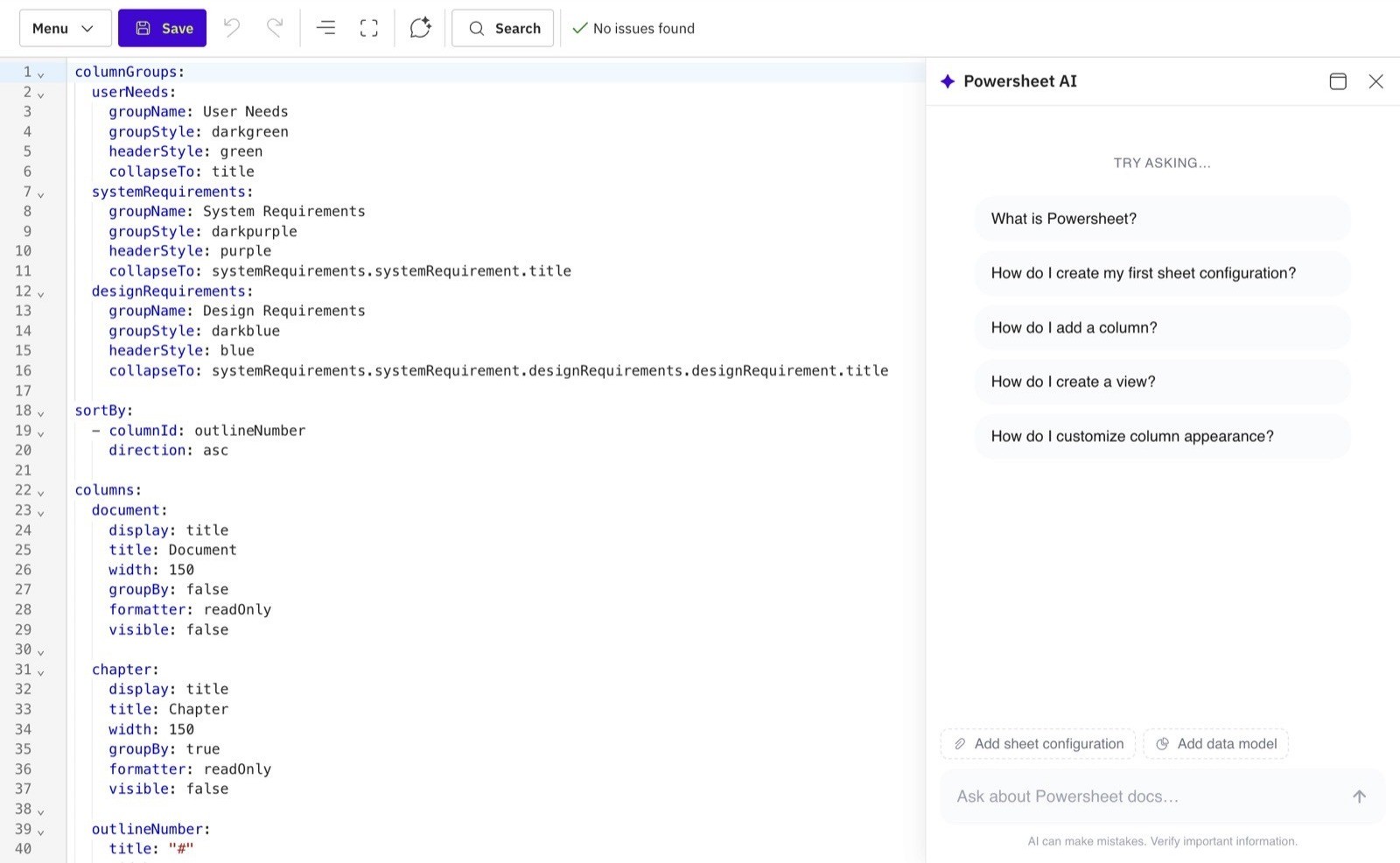
The Admin AI Assistant now sits inside Powersheet administration. You ask a configuration question in plain language and get an answer grounded in the official Nextedy documentation, with citations linking back to learn.nextedy.com so you can verify it yourself.
It handles the questions administrators actually ask: how do I configure this behaviour, which YAML property controls it, show me a working snippet, what does this existing configuration do, why is it behaving unexpectedly, what is the difference between these two concepts.
Two things matter here more than the capability itself:
Your configuration stays yours by default. Only the question text leaves your server. Attaching your data model and sheet configuration is an explicit action you take when you want the answer grounded in your actual setup — not something that happens silently.
No AI keys, no hard dependency. You do not bring your own AI API key, and Powersheet continues to work normally if the documentation search endpoint is unreachable.
The Admin AI Assistant arrives with the separately installed Nextedy AI package and needs no Nextedy AI license of its own — installing the package is enough. The in-sheet Powersheet AI Assistant, which proposes content against your Polarion data, is the one that requires a valid license. If the package is not installed, Powersheet behaves exactly as before.
How to get it: the Nextedy AI package is installed on your Polarion server alongside the products, and Nextedy AI sets out what it contains and how it is licensed. Talk to us and we will switch it on in your environment.
Read more: Use the Admin AI Assistant
Cells That Lock Themselves
Powersheet’s isReadOnly option used to be a static true or false. It now accepts an expression evaluated against the row.
That means a cell can lock on the row’s own data — a column that is meaningless for one of the work item types in a mixed sheet, or a value that must not drift once the row has downstream links — without maintaining a separate view for each case. Where the rule is really about lifecycle or about who is editing, Polarion’s own permissions and workflow remain the right tool; this covers what they cannot express.
One deliberate limitation: a dynamic lock can only add read-only. It never relaxes an existing security or metadata permission. Governance stays where it belongs.
Errors That Tell You What Went Wrong
Three Powersheet changes in June share a theme: the system used to fail quietly, and now it explains itself.
Saving a link that violates Polarion’s link role rules used to be accepted, producing invalid data. It now returns an error listing the work item types that are actually allowed.
Saving a custom field that does not exist on the row’s work item type used to fail silently. The error now names the field and the type.
Default values now work for entities backed by multiple work item types with sparse custom fields — each type uses its own defaults instead of leaking across types. (date-time and time fields do not support defaults yet.)
Silent failure in a regulated environment is worse than a clear error. This is us paying down that debt.
Gantt
Come Back to Where You Left Off
Anyone who works with a large nested Gantt knows the routine after a refresh: re-expand four levels, scroll back to the right quarter, find the item you were editing.
Gantt now restores that context. Expand and collapse state is remembered per user, per chart, and survives reloads. Vertical scroll, the visible date range, and the selected item are all restored after a refresh for the rest of your session.
It sounds small. It is the difference between resuming work and rebuilding your place in it.
A Resource View That Shows What Is Left
Resource bubbles have always shown allocated hours. Useful for reporting, less useful for deciding what to do next.
A configuration property now switches those bubbles to show either remaining available capacity or overallocated hours instead. Same green/red logic, but the number you are looking at is the one you act on.
Related: items deliberately excluded from resource load with task.setLoad(0) no longer inflate the item count above the bubble. The total now reflects only what actually contributes to load.
Read more: Resource Management Questions
Small Fixes That Matter
June carried a substantial regression and fix batch, most of it driven directly by customer reports.
Gantt
Saving a large number of changed items no longer fails on Tomcat’s 2 MB POST parameter limit
PlannedIn saves work for cross-project plans (Project Span)
Compare with Date no longer treats every item as new
Resources are sorted by name again, not by ID
Resource capacity displays correctly in cross-team view when friendly Team IDs are used
Milestone marker colours set in the Markers Script are applied again
Unscheduled children align with their parent by default again
nextedy.Gantt.multiAssignmentSameEffortForAll no longer behaves in reverse
addDays is now available in Gantt script utilities for inclusive end-date handling
Powersheet
Sheets with several nested expand columns sharing a parent navigation now populate all of them, not just the first
Risksheet
The drive dropdown shows “Risksheet” instead of a literal placeholder
What’s Next
July is a heavier month, and we will cover it properly in the next post: formula columns that calculate even when hidden in Risksheet, subqueries and URL-parametrised queries in Powersheet, and first steps towards planning against roles and departments in Gantt.
Until next month — stay efficient, connected, and let’s keep pushing Polarion forward together. 🚀